Free Freelance Invoice Template (Excel & Google Sheets)
Built in-house and tested before publishing. No signup required.
Download the invoice template (.xlsx)An invoice has one job: get you paid without a follow-up email. That means the math has to be right, the due date has to be unmissable, and the client’s bookkeeper needs to find every field where they expect it.
This template keeps to that job. Ten line-item rows with automatic totals, a discount line, tax handling that works whether your rate is 0% or 13%, and a payment-terms block near the top where clients actually read it. Every formula was verified by recalculating a complete example invoice before publishing — the same example included in the download’s second tab.
What’s in the file
Two tabs:
Invoice — blank and ready. Add your business name and contact line at the top, your client under Bill to, and your line items. Everything else computes itself.
Example (filled in) — a realistic web-design invoice so you can see exactly how the numbers flow before touching the blank one.
How the calculations work
Each line item multiplies quantity (or hours) by rate:
Amount = Qty × Rate
The row stays blank until both cells are filled — no #VALUE! errors while you’re mid-edit. Then the totals section runs:
- Subtotal — sum of all ten line amounts.
- Discount — entered as a negative number (e.g.
-50.00), so what you see is exactly what’s subtracted. If you don’t discount, leave it empty. - Tax —
(Subtotal + Discount) × Tax rate, rounded to the cent. Tax applies after the discount, which is how sales taxes are normally calculated on a discounted sale. - TOTAL DUE — subtotal + discount + tax, highlighted so it can’t be missed.
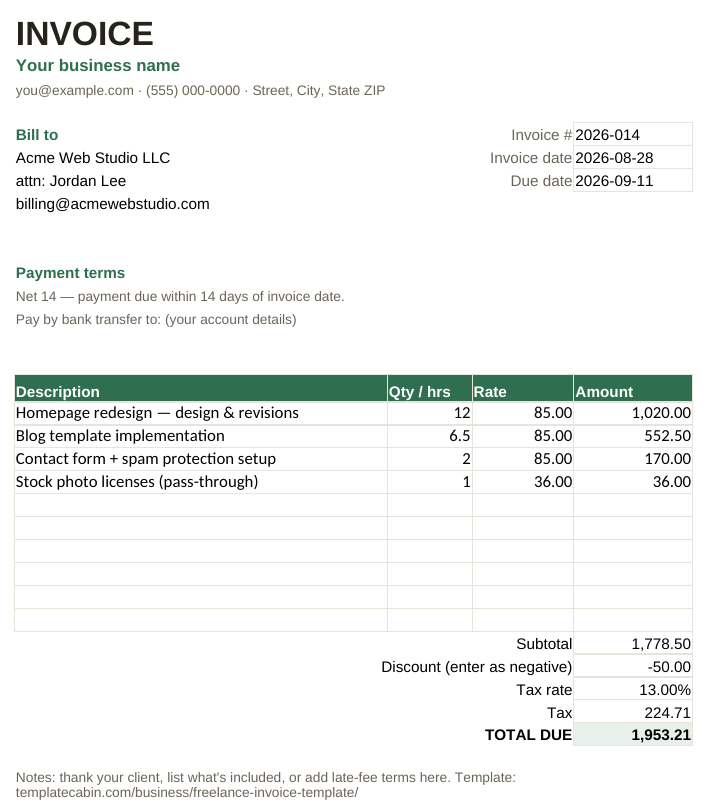
In the worked example: 12 hours of design at $85, 6.5 hours of implementation at $85, 2 hours of form setup at $85, plus a $36 pass-through license = $1,778.50 subtotal. A $50 discount and 13% tax ($224.71) bring it to $1,953.21 total due. Open the example tab and trace every one of those numbers — they’re computed live by the formulas, not typed in.
Setting your tax rate
Enter the rate as a percentage in the tax-rate cell: type 13% (or 0.13). If you don’t charge tax — many freelancers below their country’s registration threshold don’t — enter 0% and the tax line simply contributes nothing. The template doesn’t decide tax questions for you; whether you must charge tax depends on where you and your client are, so check your local rules or ask an accountant.
Using it in Google Sheets
- Open Google Sheets → blank sheet.
- File → Import → Upload → choose the downloaded file → Replace spreadsheet.
- Formulas, formatting, and both tabs carry over.
Keep one master copy, and for each new invoice duplicate the Invoice tab (right-click the tab → Duplicate) and rename it to the invoice number. Your whole billing history stays in one file, which makes tax season noticeably less painful.
Small habits that get invoices paid faster
Number invoices consistently. The example uses 2026-014 (year + sequence). Never reuse a number — it’s the key your client’s accounting software files you under.
Put the due date, not just the terms. “Net 14” means nothing to a busy client; “Due September 11” does. The template has fields for both.
Invoice the same day you finish. The strongest predictor of fast payment is a short gap between delivered work and delivered invoice.
Say how to pay. The payment-terms block has a line for your bank details or payment link. An invoice that requires a “how do I pay you?” reply adds days.
Frequently asked questions
Can I add more line rows? Yes — insert rows between the first and last item rows and the subtotal’s SUM range expands automatically. Copy an existing Amount cell into the new row so the Qty × Rate formula comes with it.
Can I use this for flat-fee projects? Enter quantity 1 and the flat fee as the rate. For milestone billing, one line per milestone.
Is it really free, including for business use? Yes — free for personal and commercial use, no signup. If a formula ever misbehaves, tell us and we’ll re-test and fix the file.
Grab the file and follow the setup steps above — it takes about two minutes.
Download the invoice template (.xlsx)